


Unleashing the Power of Desktop Ticker: A Game-Changer in Business Communication

 Quick Read
In the dynamic landscape of business communication, staying informed and connected is paramount. One innovative tool that has gained prominence in this realm is the "desktop ticker."
In the dynamic landscape of business communication, staying informed and connected is paramount. One innovative tool that has gained prominence in this realm is the “desktop ticker.” This article explores what a desktop ticker is, delving into its functionality and the game-changing role it plays in enhancing business operations.
Understanding Desktop Ticker: Breaking Down the Basics
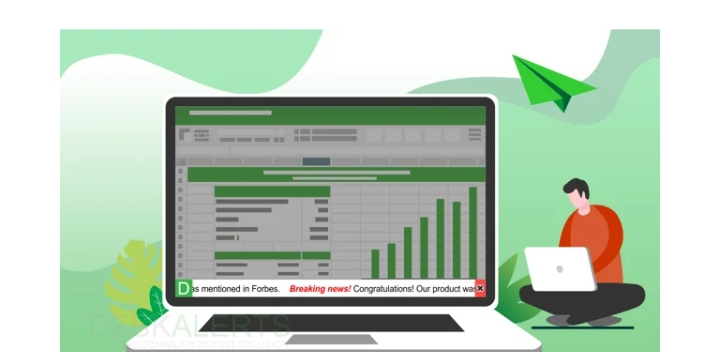
A desktop ticker is a software application designed to display real-time information or updates directly on a computer’s desktop. Think of it as a continuous stream of relevant data scrolling across your screen, providing quick and easily accessible information without the need to navigate through various applications.
Key Features of Ticker Software: A Closer Look
To harness the full potential of a desktop ticker, it’s essential to comprehend the key features embedded in ticker software:
Real-Time Updates: Desktop tickers excel in delivering real-time updates, ensuring that users receive the latest information without delay. This is particularly valuable in fast-paced business environments where timely data can make a significant impact.
Customization: Ticker software often offers a high degree of customization. Users can tailor the content displayed on the ticker to align with their specific needs, whether it’s stock market updates, news headlines, or internal announcements.
User-Friendly Interface: The beauty of desktop tickers lies in their user-friendly interface. They seamlessly integrate with the desktop environment, providing a non-intrusive yet highly visible channel for information dissemination.
Versatility: Desktop tickers are versatile tools that can cater to a variety of purposes. From employee communication to market monitoring, the adaptability of ticker software makes it a valuable asset in diverse business scenarios.
Revolutionizing Business Communication: Practical Applications of Desktop Ticker
Now that we have a grasp of what desktop tickers are and their key features, let’s delve into the transformative impact they can have on business communication.
Internal Communication Enhancement:
Employee Updates: Desktop tickers act as a real-time communication conduit for internal updates. Whether it’s company-wide announcements, policy changes, or project milestones, employees receive timely information directly on their desktops.
Meeting Reminders: In a hectic work environment, keeping track of meetings can be challenging. Desktop tickers can be programmed to display meeting reminders, ensuring that important engagements are never missed.
Financial Market Monitoring:
Stock Market Updates: For businesses with a stake in the financial markets, a desktop ticker displaying real-time stock market updates is invaluable. It provides quick insights into market trends, stock prices, and relevant financial news.
Currency Exchange Rates: In the globalized business landscape, currency exchange rates play a crucial role. Ticker software can be configured to showcase live currency rates, aiding businesses involved in international transactions.
News and Event Tracking:
Breaking News: Stay informed about the latest news impacting your industry or the business world in general. Desktop tickers deliver breaking news directly to your desktop, eliminating the need to switch between applications.
Event Countdowns: Planning for significant events or product launches? Use a desktop ticker to create countdowns, building anticipation and ensuring everyone is on the same page.
Project Management:
Task Updates: Keep project teams updated on task progress, deadlines, and any critical developments. A desktop ticker displaying project-related information fosters transparency and enhances collaboration.
Milestone Celebrations: Celebrate project milestones by showcasing achievements through the ticker. This boosts morale and recognizes the collective efforts of the team.
Implementing Desktop Ticker for Optimal Results: Best Practices
While the benefits of desktop tickers are evident, their effectiveness depends on strategic implementation. Consider the following best practices to ensure optimal results:
Content Relevance: Tailor the content displayed on the ticker to ensure its relevance to the audience. Unnecessary information may lead to distraction rather than engagement.
Consistent Updates: Maintain a consistent schedule for updating ticker content. Whether it’s hourly updates on stock prices or daily announcements, regularity fosters reliability.
Interactive Elements: Explore ticker software that incorporates interactive elements. This could include clickable links for more detailed information or options for user feedback.
Responsive Design: Opt for ticker software with a responsive design that adapts to various screen sizes and resolutions. This ensures a seamless user experience across different devices.
In Conclusion: Embracing the Future of Business Communication
The advent of desktop tickers has ushered in a new era of efficiency and connectivity in business communication. From internal updates to market monitoring, the versatility of ticker software makes it an indispensable tool for organizations looking to stay ahead in the competitive landscape. Embrace the power of desktop tickers, and revolutionize the way your business communicates and stays informed.
Comments